



The best AI tools for screenwriting have quietly moved from a niche experiment to a normal part of the writer’s desk. Industry surveys suggest that roughly 30% to 40% of working screenwriters in the US have already experimented with tools like ChatGPT for specific writing tasks, even after the 2023 WGA strike put strict guardrails around AI use in studio contracts. A separate survey of screenwriters across five Nordic countries in Europe found adoption sitting at just over 40%. That’s not a fringe trend anymore. That’s nearly half the room, on both sides of the Atlantic.
Why Every Screenwriter Is Talking About AI Right Now
You have a story stuck in your head. A scene that won’t leave you alone. A character who keeps talking even when you close your laptop.
The problem was never the idea. It was getting from page one to “FADE OUT” without losing momentum, formatting, or your sanity.
That’s exactly where AI screenwriting tools step in. They won’t write your masterpiece for you, and honestly, you don’t want them to. But they will format your script correctly, break your writer’s block, suggest sharper dialogue, and help you outline a three-act structure that actually holds together.
Whether you’re a film student prepping your thesis short, an indie writer chasing your first feature, or a working screenwriter juggling three drafts at once, this guide breaks down the seven AI tools worth your time in 2026. No fluff, no filler, just what each tool does well, what it hides under the hood, and where it falls short.
Let’s get into it.
Quick Comparison: Best AI Screenwriting Tools at a Glance
| Tool | Best For | Starting Price | Standout Strength |
|---|---|---|---|
| Arc Studio | Screenwriting and story structure | Free, then $69/year | Clean, distraction-free outlining |
| Final Draft | Professional, industry-standard screenplays | $199.99 one-time | Formatting Hollywood actually accepts |
| WriterDuet | Real-time collaborative writing | Free, then $9.99/month | Live co-writing with video chat |
| Sudowrite | Dialogue and creative scene work | $19/month | Story Bible for character consistency |
| NolanAI | AI screenwriting plus pre-production | Paid plans, check site | Script-to-budget and scheduling automation |
| Squibler | Fast first-draft generation | Around $9.99–$29/month | Structured long-form scripting templates |
| ChatGPT | Brainstorming, outlining, rewriting | Free, then $20/month | Endless flexibility for every writing stage |
The 7 Best AI Tools for Writing Film & Movie Scripts in 2026
Now let’s dig into each one properly.
1. Arc Studio: Best for Screenwriting and Story Structure
Arc Studio has quietly become one of the fastest-growing screenwriting tools among newer filmmakers, and it’s easy to see why once you open it. The interface feels calm. No cluttered menus, no confusing toolbars, just you and the page.
It handles industry-standard formatting automatically, so scene headings, action lines, and dialogue blocks snap into place as you type. You can drag and drop story beats into act columns, which makes restructuring a script far less painful than retyping pages in a traditional word processor.
What makes it worth using
- Real-time collaboration lets co-writers edit the same script together, similar to Google Docs
- Automatic cloud backup and version history protect your drafts
- Import and export in .fdx format, so it plays nicely with Final Draft users
- Native apps for iPhone and iPad, so you can revise scenes on the go
The hidden feature most people miss
Arc Studio’s beat-board view lets you plan your entire story on a visual corkboard before you write a single line of dialogue. It’s a small feature, but it’s the difference between winging a screenplay and actually structuring one.
Where it falls short
The free plan watermarks every export and caps you at two scripts, so it’s really a trial run rather than a long-term option. Android users also get browser access only, with no dedicated mobile app and no offline mode on that platform.
Best for: Film students and indie writers who want professional formatting without a steep learning curve or a high upfront cost.
2. Final Draft: Best for Professional, Industry-Standard Screenplays
If you’ve ever seen a script pass through a Hollywood production office, there’s a good chance it was written in Final Draft. It’s been the format that agents, managers, and studios expect for decades, and the .fdx file type it created is still the interchange standard other tools build compatibility around.
Final Draft 13 brought real AI muscle to a tool that used to be just a formatting machine. It now reads your script and generates development notes on pacing, structure, and character arcs. It also includes a Beat Board that analyzes your story’s structure and flags missing narrative beats before they become a problem in your third act.
What makes it worth using
- Automatic formatting for feature films, TV pilots, stage plays, and audio drama
- Colored revision pages that match real production workflows
- Script Notes AI for structural feedback without hiring a script consultant
- A scene navigator sidebar for jumping around long, complex scripts
The hidden feature most people miss
Final Draft generates detailed production reports on characters, locations, and props directly from your script. That’s a feature line producers usually pay for elsewhere, built right into your writing software.
Where it falls short
It’s a one-time purchase, but cloud access and mobile use are sold separately, so the real cost creeps up if you want everything. It also has a steeper learning curve than newer browser-based tools, and there’s no permanent free plan to test it first.
Best for: Working screenwriters and film students who want to learn on the same software professionals actually use.
3. WriterDuet: Best for Collaborative Screenwriting
Co-writing a script over email attachments is a special kind of chaos. WriterDuet exists to end that chaos. It’s built around real-time collaboration, letting multiple writers edit the same script simultaneously while seeing each other’s cursors move across the page.
Beyond the collaboration angle, WriterDuet layers in AI-driven suggestions for dialogue and plot points, which is genuinely useful when you and your co-writer hit a scene neither of you knows how to finish.
What makes it worth using
- Free tier available, with paid plans starting around $9.99 a month
- Built-in text and video chat, so notes happen inside the script, not in a separate app
- Read-aloud narration to hear how your dialogue actually sounds
- Automatic translation and templates for stage plays, comics, and podcasts
The hidden feature most people miss
WriterDuet tracks detailed script statistics and lets you lock specific lines or scenes, which is a lifesaver when a producer note comes in halfway through revisions and you need to protect finished sections from accidental edits.
Where it falls short
The interface feels a step behind more modern tools visually, and some users report a learning curve around its filtering and customization options. Higher tiers add up quickly if you need the full production feature set.
Best for: Writing partners, small writers’ rooms, and student teams working on the same script from different locations.
4. Sudowrite: Best for Dialogue and Creative Scene Development
Sudowrite wasn’t built specifically for screenplay formatting, and that’s actually its strength, not its weakness. It’s a prose and creative-writing engine at heart, which means it’s exceptional at generating vivid scene descriptions, exploring character voice, and pushing past a stuck moment in a script.
Its Story Bible feature tracks your characters, world, and plot details, then keeps every generated scene consistent with what you’ve already established. That consistency matters more than people expect once a script grows past page thirty.
What makes it worth using
- Describe and rewrite tools for punching up flat dialogue
- Character consistency tracking across long documents
- Brainstorming tools for breaking through writer’s block on a specific scene
- Works alongside multiple underlying AI models for varied creative output
The hidden feature most people miss
Sudowrite’s tone and style controls let you generate the same scene in wildly different emotional registers, so you can test whether a confrontation lands better as quiet tension or a full blowout before committing to either.
Where it falls short
It doesn’t natively export industry-standard screenplay formatting, so you’ll still need to move finished scenes into Final Draft, Arc Studio, or a similar tool. There’s also no permanent free plan, and the monthly word limits on lower tiers disappear fast once you’re deep in a draft.
Best for: Screenwriters who already have their structure locked and need help making individual scenes and dialogue sing.
5. NolanAI: Best for AI-Assisted Screenwriting Through Pre-Production
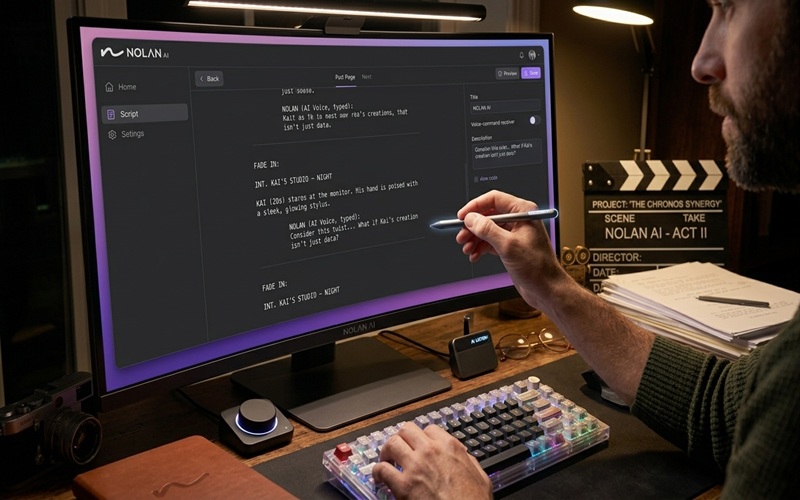
NolanAI takes a different approach than pure writing software. It treats your screenplay as the starting point for everything that happens next: budgeting, scheduling, and pre-production planning.
Once your script is in the system, NolanAI breaks it down scene by scene and builds a shooting schedule automatically, complete with a drag-and-drop stripboard you can filter by cast, location, or time of day. It then estimates a production budget based directly on what you’ve actually written, not a generic template.
What makes it worth using
- AI-driven story and character development tools during the writing phase itself
- Automatic script breakdown into shootable, schedulable units
- Budget estimates by department, scene, or shoot day
- Import support for existing FDX and PDF scripts
The hidden feature most people miss
The budget and schedule update automatically whenever you revise the script, so a rewrite doesn’t mean starting your production paperwork over from scratch. That alone can save a student filmmaker hours of manual recalculation.
Where it falls short
It’s more of a full production suite than a dedicated writing environment, so if all you want is a clean drafting tool, it can feel like overkill. Pricing also isn’t as transparent upfront as some competitors, so budget for a bit of research before committing.
Best for: Filmmakers and film students who want their script to double as a functional production document from day one.
6. Squibler: Best for Fast AI Script Generation
Sometimes you don’t need a writing partner. You need a starting point, fast. Squibler leans into that need with AI tools built for turning a loose idea into a structured first draft in a fraction of the usual time.
It handles both novels and scripts, with an outline builder, plot-beat mapping, and character creation tools that adapt to your genre and tone. For writers who freeze up at a blank page, that structure alone can be the difference between starting today and starting next month.
What makes it worth using
- Guided drafting with smart prompts based on your genre
- Chapter and scene tracking to keep long projects organized
- Worldbuilding tools for scripts with dense settings or lore
- Collaboration features for writing teams and workshop groups
The hidden feature most people miss
Squibler supports translation into dozens of languages, which quietly opens the door to adapting a script for international festivals or co-production partners without hiring a separate translator for your first draft pass.
Where it falls short
Because it serves both novelists and screenwriters, some of its templates lean more literary than cinematic, so you may need to adjust generated content to fit strict screenplay conventions. It’s also better at first drafts than polished final dialogue.
Best for: Writers who need to beat a deadline and get a full draft on the page before refining it elsewhere.
7. ChatGPT: Best for Brainstorming, Outlining, and Rewriting
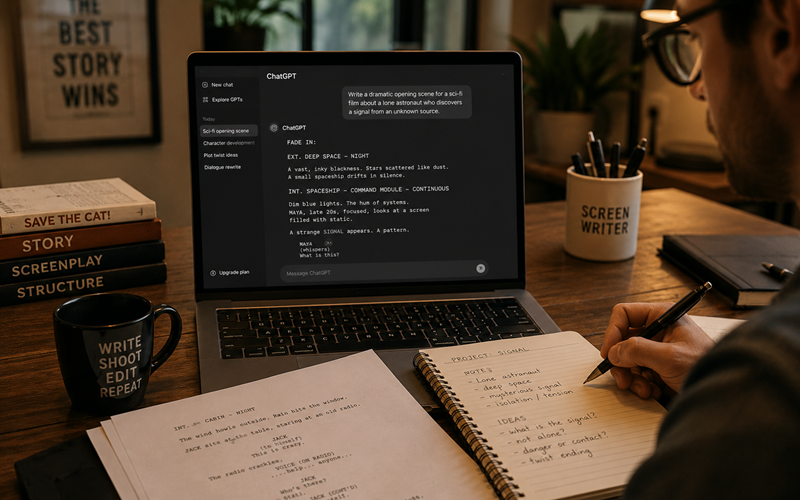
ChatGPT isn’t a screenwriting tool in the traditional sense, and that’s exactly why it belongs on this list. It’s the most flexible option here, useful at every stage of the process rather than just one.
Stuck on a logline? Feed it your premise and ask for ten variations. Need a character who feels distinct from your protagonist? Ask it to draft a voice profile. Rewriting a scene that isn’t landing? Paste it in and ask for three different tonal takes. It won’t format your script to industry standard on its own, but paired with a dedicated screenwriting tool, it becomes a genuinely useful creative partner.
What makes it worth using
- Free to start, with a paid tier for heavier daily use
- Useful for loglines, character bios, scene outlines, and dialogue polish
- Can analyze pacing and structure when you paste in existing pages
- Available on desktop and mobile, so ideas don’t have to wait
The hidden feature most people miss
You can build a custom project or persistent instructions that remind it of your story’s tone, characters, and rules across sessions, so you’re not re-explaining your world every time you open a new chat.
Where it falls short
It has no dedicated screenplay formatting, no scene navigation, and no production tools, so it works best as a supplement to real screenwriting software, not a replacement for it. Output also needs a careful editing pass, since it can default to generic phrasing without specific direction.
Best for: Early brainstorming, table-read prep, and rewriting sessions when you need a fast second opinion.
How to Choose the Right AI Screenwriting Tool for You
Not every writer needs every tool on this list. Match the tool to the actual problem you’re solving.
- If formatting and industry credibility matter most, go with Final Draft.
- If you want a modern, calmer writing experience, try Arc Studio.
- If you’re writing with a partner or small team, WriterDuet earns its place.
- If your dialogue feels flat, bring in Sudowrite for scene-level polish.
- If you’re also producing the film yourself, NolanAI turns your script into a production plan.
- If you need a fast first draft, Squibler gets you there quicker.
- If you just need a thinking partner at every stage, keep ChatGPT open in another tab.
Many working screenwriters actually combine two tools: one for structured drafting and formatting, and one for creative brainstorming or dialogue polish. There’s no rule that says you have to pick just one.
Frequently Asked Questions
Can AI actually write a full movie script by itself?
AI can generate scenes, dialogue, and structure, but a genuinely producible screenplay still needs a human writer shaping voice, theme, and emotional truth. Treat AI as a drafting partner, not a replacement for your creative judgment.
Which AI tool is best for beginners and film students?
Arc Studio is a strong starting point because of its clean interface and generous free plan. ChatGPT is also useful early on for brainstorming loglines and outlines before you commit to a full draft.
Do studios and agents accept scripts written with AI assistance?
Yes, as long as the final script is properly formatted and reads like a professional screenplay. What matters to readers is the finished page, not which tools helped you get there.
Is Final Draft still worth buying in 2026 with so many AI alternatives available?
For working professionals and anyone submitting to studios or agencies, yes. Its .fdx format remains the industry standard, and its newer AI features keep it competitive with browser-based tools.
Are free AI screenwriting tools good enough for a real screenplay?
Free tiers work well for testing a tool or drafting a short script, but most add watermarks, cap your project count, or limit AI usage. Budget for a paid plan once you’re serious about a full-length script.
What’s the difference between a screenwriting tool and a general AI writing tool?
Dedicated screenwriting software like Final Draft or Arc Studio automatically formats scripts to industry standards. General tools like ChatGPT (which could also be good for generating AI speeches) or Sudowrite are excellent for content and creativity but need a separate formatting step before a script is production-ready.
Final Words
There’s no single best AI tool for screenwriting, only the best one for where you are right now in your process. A film student polishing a thesis short has different needs than a working writer juggling three studio drafts.
Start with the problem you actually have. Stuck on structure? Try Arc Studio. Need industry-standard formatting? Final Draft still leads. Writing with a partner? WriterDuet. Dialogue feels stiff? Sudowrite. Producing it yourself? NolanAI. Racing a deadline? Squibler. Need a brainstorming partner at 2 a.m.? ChatGPT is always open.
So, what’s next? Pick the tool that fits your style, open a blank page, and start writing. The perfect tool won’t write the story for you. Finishing the script will.
