

You plug in your OBD2 scanner, turn the key, and wait. Nothing happens. The screen shows “No Response,” “Unable to Connect to ECU,” or just a blank spot where your fault codes should be. It happens to almost everyone who owns a scan tool, and it happens across every market we work with at DigitalCruch, whether the car sits in a driveway in Ohio, a garage in Manchester, a Straße in Munich, or a parking spot in Lyon.
Every road-going car built after certain dates is required by law to have an OBD2 (or EOBD in Europe) port. In the US, that mandate has applied to every gasoline car sold since 1996. The EU introduced EOBD for petrol cars in 2001 and for diesel cars in 2004. Canada follows the US standard closely, and the UK and France both require it for MOT and Contrôle Technique testing. So the port is there. The problem almost never sits with the law. It sits with the connection between your scanner, that port, and the car’s ECU (engine control unit).
We have pulled apart dozens of these complaints from mechanics, forum threads, and our own bench tests. Below are the 10 fixes that solve the vast majority of connection failures, in the order we actually try them.
Why OBD2 Scanners Fail to Connect
Before the fixes, it helps to know the usual suspects:
- A blown fuse on the diagnostic port circuit
- The ignition sitting in the wrong position
- A cheap or counterfeit ELM327 chip
- The wrong communication protocol selected
- Dirty, bent, or corroded pins inside the port
- Weak Bluetooth or Wi-Fi signal
- Outdated scanner firmware or app software
- A low car battery that puts the ECU to sleep
- Aftermarket wiring or an alarm system blocking the port
- A genuine vehicle-side fault, not the scanner at all
Work through the list below, and you will land on the cause in almost every case.
The 10 Fixes That Actually Work
Let’s explore the key ways to fix an OBD2 scanner that fails to connect:
1. Confirm the Ignition Position First
This sounds too simple to matter, but it causes more failed connections than any other issue on this list. The ECU only wakes up and communicates over the OBD2 bus when the ignition is in the “ON” position, not “ACC” or “START.”
What to do: Plug the scanner in first, then turn the key to ON without cranking the engine. Give it 3 to 5 seconds before you press connect on the app or handheld unit. On keyless-start vehicles (common across German and French models), press the start button once without pressing the brake pedal. That puts the car in accessory or ignition mode without starting the engine.
If you already tried connecting with the ignition off, unplug the scanner, wait 10 seconds, then repeat the sequence in the correct order. Order matters more than most owners expect.
2. Check the OBD2 Port Fuse
The diagnostic port has its own fuse in nearly every vehicle, and that fuse also frequently powers the cigarette lighter, 12V accessory socket, or radio memory. If that fuse blows, the port loses power completely, even though everything else in the car runs fine.
What to do: Check your owner’s manual or the fuse box lid for the fuse labelled “OBD,” “DLC” (Data Link Connector), or “Aux Power.” Pull it out and inspect the metal strip inside. A broken strip means a blown fuse. Replace it with one of the same amperage rating, never a higher one.
This single fix resolves connection failures on older Toyotas, Fords, and GM vehicles more often than owners expect, especially on cars where a previous owner plugged in a phone charger or dash cam that drew too much current.
3. Clean and Inspect the Port Pins
The OBD2 connector uses 16 pins in a standardised SAE J1962 layout, but not every pin carries a signal on every car. Dirt, road grime, and corrosion build up inside the port over years of use, especially in colder climates that use road salt, common across the UK, Canada, and northern Germany.
What to do: Use a flashlight to look inside the port for bent, pushed-back, or corroded pins. A can of contact cleaner or electronics-safe compressed air clears out debris. Never use water or oil-based cleaners. If a pin looks bent, gently straighten it with a small precision screwdriver before plugging anything back in.
4. Reseat the Connector Properly
Plugging the scanner in at an angle or forcing it in too quickly causes intermittent contact, even when every pin looks fine. This is one of the most overlooked fixes because the scanner often powers on anyway, which can trick people into thinking the port connection isn’t the issue.
What to do: Remove the scanner, line it up straight with the port, and push it in slowly until it clicks or stops fully. Give it a light wiggle test once seated. If it moves more than a millimetre, the port itself may need repair by a mechanic, particularly on high-mileage vehicles where the port bracket has loosened.
5. Set the Correct Communication Protocol Manually
Automatic protocol detection fails more often than manufacturers admit. Vehicles use one of five main OBD2 protocols: SAE J1850 PWM, SAE J1850 VPW, ISO 9141-2, ISO 14230-4 (KWP2000), or ISO 15765-4 (CAN). Since 2008 in the US and since 2001/2004 in the EU (petrol/diesel), CAN has become nearly universal, but plenty of vehicles from the early 2000s still use the older protocols, and auto-detect sometimes picks the wrong one.
What to do: Open your scanner app’s settings menu (Torque, Car Scanner ELM327, or your handheld’s setup menu) and look for a protocol selector. Search for your car’s make, model, and year along with “OBD2 protocol” to confirm which one it uses, then set it manually instead of leaving it on auto. This single change fixes a large share of “connects to adapter but not to ECU” complaints we see on forums for Nissan, GM, and older European models.
6. Re-pair Bluetooth or Wi-Fi Adapters From Scratch
Wireless ELM327 adapters are the most popular scanners on the market because they work with a phone app, but they are also the most common source of “paired but not connected” errors. Bluetooth pairing and app-level connection are two separate steps, and most people stop after the first.
What to do: Go into your phone’s Bluetooth settings and forget the device completely, even if it currently shows as paired. Restart the adapter by unplugging it, then pair again from scratch. Open your scanner app afterwards and select the adapter by name inside the app itself, not just in the phone’s Bluetooth menu. Some adapters use a default PIN of 0000 or 1234, so try both if prompted.
For Wi-Fi-based adapters, connect your phone directly to the adapter’s Wi-Fi network before opening the app, and temporarily turn off mobile data so the phone doesn’t get confused between the two networks.
7. Move Closer and Cut Down Interference
Cheaper adapters use weak Bluetooth transmitters, and signal strength drops fast with distance or obstacles. A phone sitting in a cup holder two rows back, or a dashboard packed with other electronics, can cause enough interference to break the connection mid-scan.
What to do: Keep your phone or tablet within about one meter of the adapter during setup. Turn off nearby Wi-Fi hotspots or other Bluetooth devices you are not using. If you drive in an area with heavy 2.4 GHz congestion (e.g., city apartments with dozens of routers nearby), a USB-connected scanner sidesteps the issue completely.
8. Update Scanner Firmware and App Software
Manufacturers push firmware and app updates specifically to fix ECU compatibility bugs. Running an outdated version is one of the quieter causes of connection failure, because the app often still opens and looks normal.
What to do: Check your adapter manufacturer’s website or app for the latest firmware version, and check your phone’s app store for pending updates to your scanner software. Vgate, Veepeak, and OBDLink all publish changelogs that explicitly mention ECU or protocol fixes, so it is worth reading before you install.
9. Rule Out a Counterfeit or Cloned ELM327 Chip
This is the fix nobody wants to hear, but it explains a huge share of connection complaints. The ELM327 chip design is widely cloned, and many budget adapters sold online run modified firmware that reports itself as a genuine ELM327 but does not actually support the full command set. These clones often connect fine to simple engine codes but fail completely on ABS, airbag, or manufacturer-specific modules.
What to do: Run a compatibility test using an app like EOBD Facile or Car Scanner to check whether your adapter supports the full mandatory PID list. If most functions fail the test, the adapter itself is defective or a clone, not your car. Buy from established brands (OBDLink, Veepeak, Vgate, Foxwell) rather than unbranded listings, and keep the receipt so you can return a faulty unit.
10. Check Vehicle-Side Issues Before Blaming the Scanner
Sometimes the scanner and the port both work fine, and the fault sits with the car. A weak battery below roughly 12.2V can put the ECU into a low-power state that blocks communication entirely. Aftermarket alarms, remote starters, or poorly wired accessories sometimes tap into the OBD2 circuit and interfere with the signal. Some ECUs also enter a sleep mode after the car sits unused for days and need a full ignition cycle to wake up properly.
What to do: Check your battery voltage with a multimeter before you troubleshoot anything else. Anything under 12.4V at rest is worth charging first. If your car has aftermarket electronics installed near the dashboard or steering column, disconnect them temporarily and retest. Cycle the ignition on and off twice before your third connection attempt.
Quick Diagnosis Table
| Symptom | Likely Cause | Fix Number |
|---|---|---|
| Scanner powers on, no ECU data | Wrong protocol or ignition timing | 1, 5 |
| Scanner won’t power on at all | Blown fuse or dirty pins | 2, 3 |
| Bluetooth shows “paired” but app says disconnected | Pairing not app-linked | 6 |
| Connects sometimes, drops randomly | Loose port or weak Bluetooth signal | 4, 7 |
| Reads engine codes, fails on ABS/airbag | Cloned or limited chip | 9 |
| Worked before, suddenly stopped | Weak battery or aftermarket wiring | 10 |
When the Problem Is the Vehicle, Not the Scanner
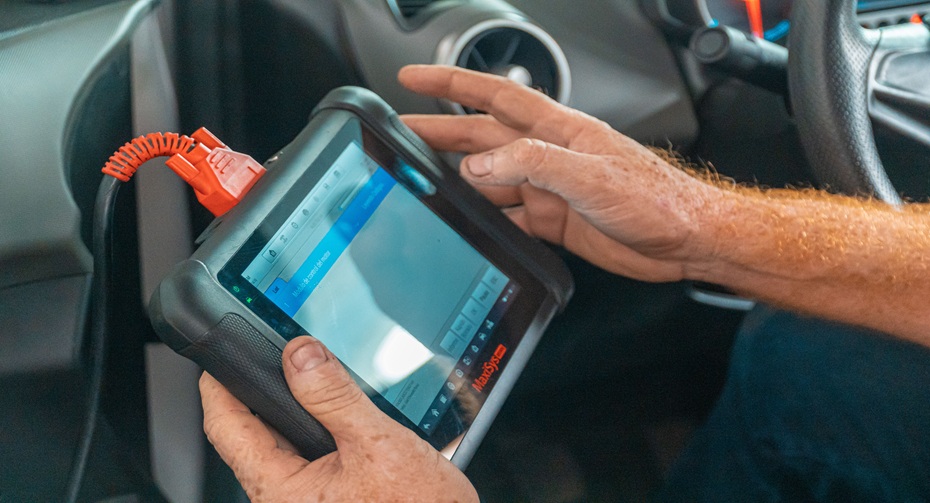
If you have worked through all 10 fixes and still see nothing, test the port with a second scanner if you can borrow one, or take the car to an independent garage that carries a professional-grade scan tool. A shop-grade tool (Snap-on, Autel MaxiSys, Bosch) uses direct manufacturer protocols rather than a generic ELM327 chip, and it will confirm within minutes whether the fault sits in the car’s wiring, the ECU itself, or a bad ground connection.
When to Stop Troubleshooting and Call a Professional
Stop and book a diagnostic appointment if you notice any of the following: a burning smell near the dashboard, a fuse that blows again immediately after replacement, warning lights that flicker on and off without a clear pattern, or a battery that drains overnight even with everything switched off. These point to wiring faults that go beyond what a scan tool troubleshooting guide can fix safely at home.
FAQs
Why does my OBD2 scanner connect to my Bluetooth but not read any codes?
Bluetooth pairing only links your phone to the adapter’s radio. Your scanner app still needs to open its own connection to the ECU afterwards, and that step commonly fails if the protocol is set to auto or the ignition wasn’t on when you connected.
Can a low car battery stop an OBD2 scanner from connecting?
Yes. Most ECUs require at least 12V to remain fully awake and respond to scan requests. A battery reading below 12.2V often causes intermittent or failed connections even when the scanner and port both work correctly.
Do cheap OBD2 scanners actually work?
Many budget adapters work fine for basic engine codes, but a large share of unbranded listings use cloned firmware that fails on manufacturer-specific systems such as ABS or airbags. Buying from a known brand significantly reduces this risk.
Is the OBD2 port the same in every country?
The physical 16-pin connector (SAE J1962) is standardised worldwide, but the underlying protocol can differ by manufacturer and model year. US, UK, German, French, and Canadian vehicles all use the same port shape, though older European diesels sometimes ran ISO protocols rather than CAN before 2004.
Why does my scanner work on one car but not another?
Different vehicles use different OBD2 protocols and different manufacturer-specific PIDs. A scanner that reads a 2015 Ford perfectly might struggle with a 2003 Volkswagen if it does not support the older KWP2000 protocol that car uses.
Should I replace my OBD2 port myself?
If the port has physically loose pins, a cracked housing, or corrosion damage that goes beyond a simple cleaning, have a qualified mechanic replace the connector. It sits close to airbag and safety wiring on many dashboards, so this is not a repair to rush through without the right reference diagrams.
Final Words
Nine times out of ten, a scanner that refuses to connect is not broken. It is a fuse, a protocol setting, a pairing step, or a battery reading away from working perfectly. Work through these fixes in order, starting with the free ones like ignition timing and port cleaning before you assume you need a new adapter.
We put this guide together at DigitalCruch after comparing real complaints from drivers across the US, UK, Germany, Canada, and France, because the same ten problems show up again and again regardless of which car sits in the driveway. If you have worked through the list and your scanner still won’t talk to your ECU, that is the point where a proper shop-grade diagnostic makes more sense than another hour of guessing.